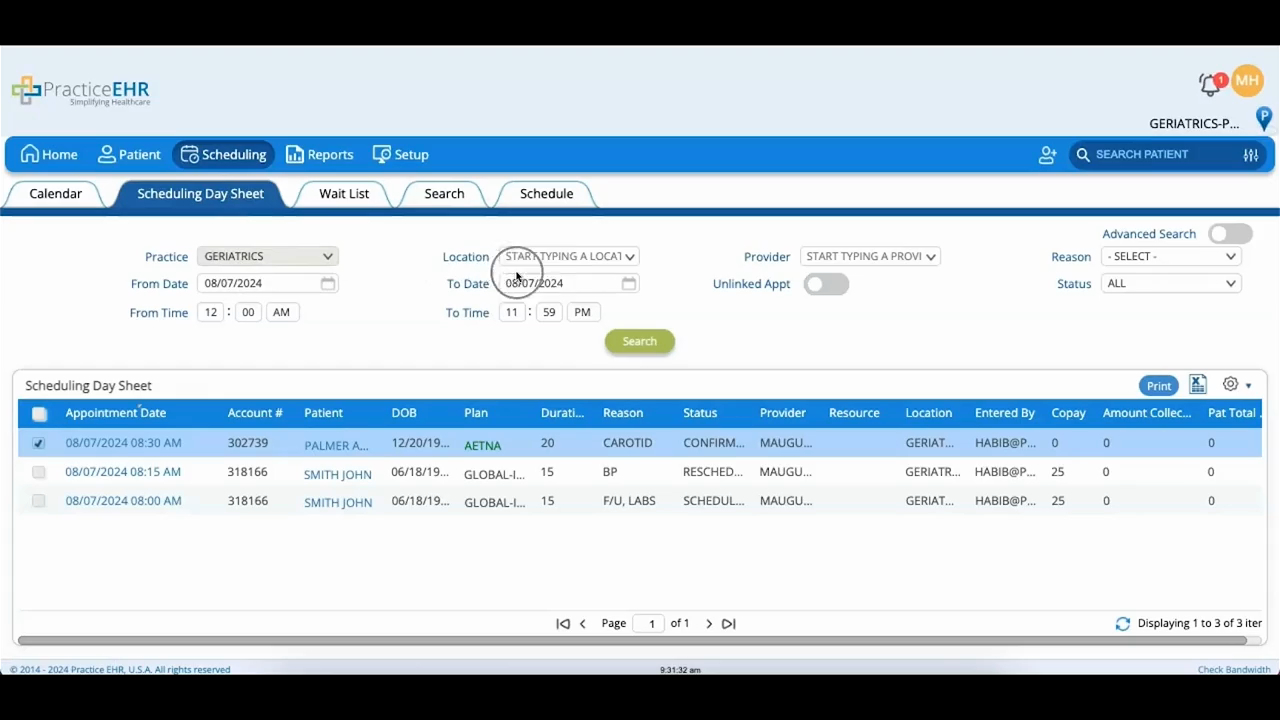
Scheduling Day Sheet
 Updated on June 10, 2026 | 05:20 PM – CST
The Scheduling Day Sheet is where you go for anything tied to patient appointments. You can pull up every appointment booked for one patient, or see everything scheduled on a given day.
Set your filters across the top (practice, location, provider, date and time range, reason, and status) and the matching appointments load as a list below. To search by patient name instead, check the Advanced Search box.
There's also an Unlinked Appointment toggle that surfaces appointments that lost their calendar slot after a change, so you can find them and reschedule.
With results on screen, select individual appointments or select all, then click the gear icon to act on them. Move sends an appointment to a different provider, location, or date. Cancel cancels the ones you've selected, and Delete removes them for good, so use that one carefully.
