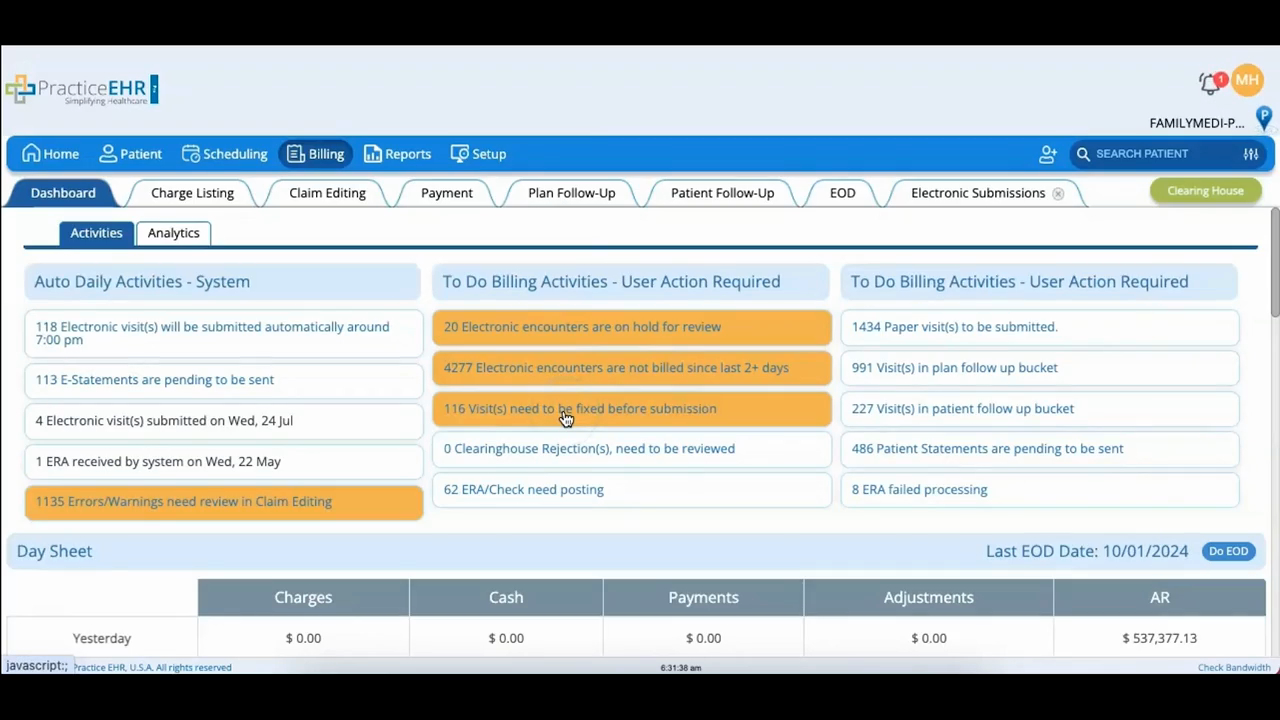
Billing Module - Dashboard
 Updated on June 10, 2026 | 05:44 PM – CST
The Billing dashboard is where you keep an eye on your practice's financial health through a set of key indicators.
At the top, Auto Daily Activities shows the billing tasks the system handles on its own. Check the auto submission box and claims, or electronic visits, go to the clearinghouse at a set time each day. This area also holds eStatements, the patient statements that appear in the portal, and ERAs (electronic remittance advice), which show payments received on submitted claims.
Below that, To-Do Billing Activities lists the work that needs a person. Electronic encounters on hold get billed and submitted manually. Visits missing information can be fixed and sent. Payer-rejected visits can be reviewed and resubmitted. Paper visits print and go out by mail to plans that don't take electronic claims, and visits needing follow-up move into the plan or patient follow-up buckets.
Two more sections round it out: Aging Based on DOS breaks down plan and patient balances by date of service, and Plan Follow-Up surfaces the most common denial reasons and how much they're costing you, which is a useful place to look for ways to cut denials.
