Billing Activities - Billing Module
 Updated on June 10, 2026 | 06:34 PM – CST
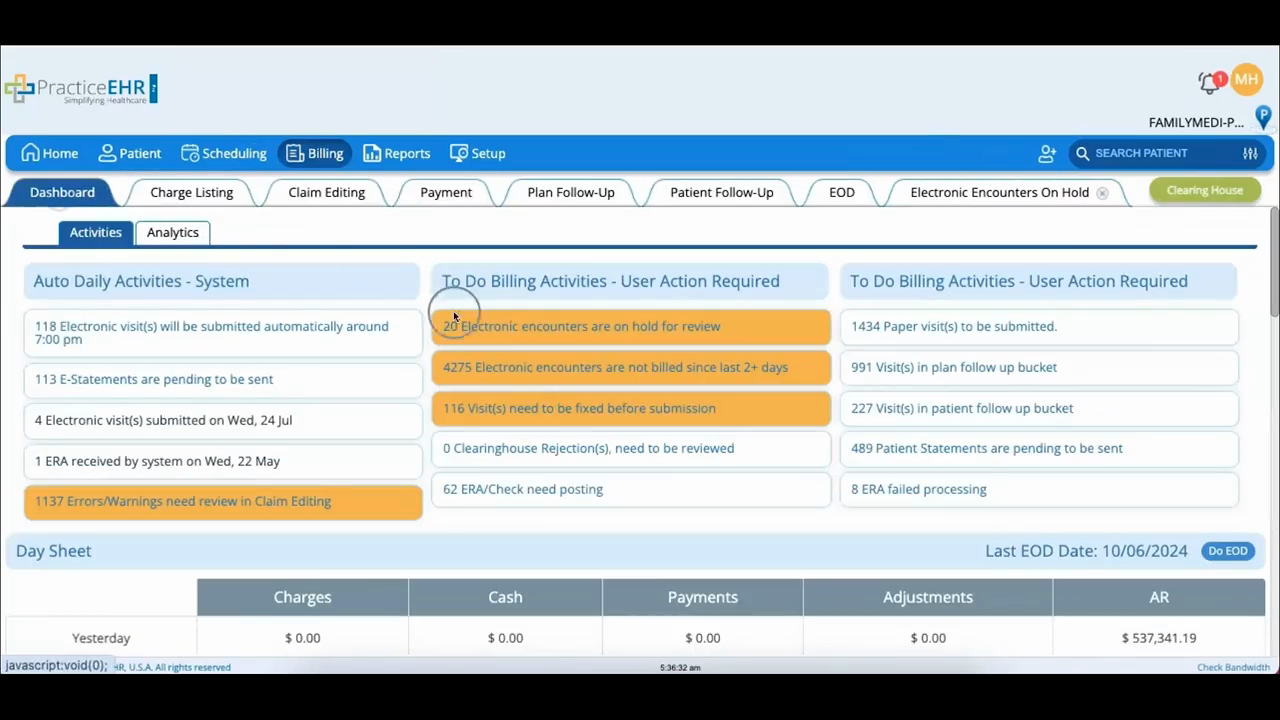
The To-Do Billing Activities section is the running list of billing tasks that need a person to step in, and this video walks each bucket in turn.
Several are about getting a claim out the door: encounters a provider put on hold for review, encounters that have sat unbilled past forty-eight hours, visits that need edits before they'll submit, and visits that the payer rejected.
The pattern for all of these is the same: open the visit from the bucket, fix or review what's flagged, and either set it to Ready to Bill or click Update Visit, and the task clears.
The rest of the buckets cover money coming in and going out.
ERA Check Need Posting holds electronic remits waiting to be posted, which you can do here or leave to auto-posting.
Paper Visits to be Submitted are claims that can't go electronically. Print them and click Plan Paper Submission to update the status.
Two buckets hand off to the follow-up tabs: a plan follow-up item opens the Plan Follow-Up tab, while a patient follow-up item (copays and other patient responsibility) gets worked under your internal collection policy.
Patient Statements Pending lists balances ready to bill the patient, where the system sends a few rounds of statements before escalating.
And Error Failed Processing is the cleanup bucket for remits that didn't post correctly. Fix the issue and click Resolve to clear it.
